

Yes, if you keep sessions brief, aim the light only at the area you want to treat, and avoid leaving a bright panel on beside your monitor. The least disruptive setup is usually a short session before calls, between meetings, or during low-focus work rather than while you are staring directly at a screen.
Does your neck tighten up by midafternoon, your eyes feel overworked, and the idea of adding one more wellness gadget to your desk sound like a distraction? A desk routine can be simple enough to fit into a coffee break, and when it is set up well, it is more likely to support comfort than interfere with your workflow. This guide explains when desk use makes sense and how to do it without making calls, screen time, or concentration worse.
When Desk Use Makes Sense
For most people, desk use is generally feasible when it is treated as a short, intentional session rather than a glowing accessory that runs all day. That distinction matters in real life. A panel on your desk can seem harmless, but the more practical approach is to use it as a timed recovery tool, then switch it off and return to normal lighting.
In practice, desk-based sessions work best for people trying to support surface-level skin concerns around the face or chest, or mild muscle and posture tension around the neck, shoulders, and upper back. They make less sense if you expect dramatic improvements in focus, productivity, or chronic pain from the light alone. Mainstream medical sources such as evidence remains limited for many promoted uses, even though short-term safety is generally favorable when devices are used correctly.
That evidence gap matters. Skin-related benefits have the most consistent support, while broader claims about mood, cognition, and pain remain less standardized. There is legitimate medical literature behind photobiomodulation for skin care, but dosing is not well standardized, and home devices vary widely in output.
What It Is and Why It Can Clash With Desk Work
Red light therapy uses low-intensity red and near-infrared light to stimulate cellular activity, often through mitochondrial pathways that may support repair, circulation, and inflammation control. At a desk, that matters because the same light that may be useful for treatment can also become visually annoying if it is bright, poorly aimed, or placed directly in your line of sight.
The main disruption risk is usually not the treatment itself. It is the setup. If a panel is shining into your eyes, reflecting off your glasses, washing out your webcam image, or competing with your screen brightness, you are using it like room lighting instead of targeted therapy. That is why desk use tends to work better when the panel sits off to the side and points at the treatment area rather than your eyes.
A simple example is shoulder tension from laptop posture. A small panel angled toward one upper trapezius muscle for 10 minutes between calls is far less disruptive than a front-facing panel aimed at your whole face while you try to read email. The first acts like a recovery tool. The second acts like a visual stressor.
Will It Interfere With Video Calls or Screen Focus?
For active calls, the honest answer is often yes, at least a little. Eye exposure can be harmful, and even when you are not looking straight into the device, bright red spill can change how you look on camera and make your screen harder to read comfortably. If your work depends on color accuracy, sharp reading, or sustained visual concentration, running a bright panel during the task is usually not the best option.
For lighter desk work, the answer is more conditional. Short sessions can fit during administrative work, listening-only meetings, or blocks when you are not visually locked onto fine details. A common sweet spot is 5 to 10 minutes before a call, over lunch, or right after a long writing session. That timing gives you the convenience of desk access without forcing your eyes and attention to compete with the treatment.
There is also a useful distinction between red light and blue-heavy light. Red light does not disrupt melatonin the way blue light does, which is one reason some people find evening use more comfortable than extended screen exposure late at night. Still, “less disruptive than blue light” does not mean “ideal to stare at while working.” Comfort and task quality still depend on brightness, distance, and angle.
The Best Desk Setup for Minimal Disruption

Distance matters because light intensity falls off as you move farther away, so desk use should be set up with a specific purpose. For skin-focused use, many home routines place the device about 6 to 12 inches from the target area for around 10 to 15 minutes. For deeper recovery goals, users often stay closer and treat a smaller area rather than trying to light the entire desk.
The least disruptive arrangement usually looks like this: the panel sits slightly off-center, below or beside monitor height, and aims at the face, neck, or shoulder without shining directly into the eyes. If you wear glasses, check for glare. If you are on camera, test the webcam image once before relying on the setup during work hours. A red cast on your face may be fine for solo work but distracting on a client call.
Work situation |
Better approach |
Back-to-back video meetings |
Use the device before the first call or between meetings |
Deep screen work like spreadsheets or design |
Keep sessions separate from the task |
Light admin or audio-only meetings |
A short side-angled session may be tolerable |
Aim at the sore area instead of the face |
How Long Should a Desk Session Be?
Most home-use guidance falls around 10 to 20 minutes, but desk routines often work better when they start shorter. If you are new to it, 1 to 2 minutes per target area in the first week is a sensible way to test comfort, then build toward 5 to 10 minutes. That approach is practical because it lowers the chance that you will overdo it, irritate your eyes, or abandon the habit because it feels inconvenient.
Consistency matters more than marathon sessions. Home-use guidance points in the same direction: a few measured sessions each week are more realistic than trying to compensate with occasional long exposures. If your desk schedule is unpredictable, a 5-minute pre-call or post-lunch session you can repeat is more useful than a 20-minute block you never actually keep.
Results also tend to be gradual. Visible changes often require repeated sessions over weeks or months, so desk use should be framed as a convenience strategy, not a quick fix. If you are using it for skin, tracking photos every couple of weeks is more reliable than judging progress day by day.
Safety and Comfort
Short-term safety is generally favorable, but desk use adds one obvious risk: it is easy to get casual with a device that sits beside your keyboard. That is when people stop timing sessions, forget about eye protection, or let the panel shine directly toward their face longer than planned.
Protecting your eyes is the nonnegotiable part. If your device instructions call for goggles, use them. If the panel feels glaring, causes a headache, or triggers visual discomfort, stop trying to tolerate it and change the setup. Temporary redness, tightness, irritation, or headaches are the kinds of problems people most often notice when the dose or positioning is off.
Home devices also differ in power and quality. FDA-cleared consumer devices are the safer bet, but clearance does not mean every claim is proven. It mainly indicates that the product met a safety pathway. If you have a light-sensitive condition, use photosensitizing medication, have significant eye disease, or have a history of skin cancer, it is smarter to clear the plan with a clinician before making desk use a daily habit.
A Practical Routine That Usually Works
For a workday routine, the most realistic pattern is a short morning or midday session anchored to something you already do, such as coffee, a calendar reset, or the break between meetings. That habit-first approach is what makes people consistent. If your goal is facial skin support, a brief session before makeup or sunscreen is more practical than trying to work under the light. If your goal is recovery, using it after a workout or at the end of a desk block often feels more natural.
A simple rule works well: if the light makes your screen harder to read, changes your camera image, or pulls your attention away from work, it is not the right time to use it. Move the session to a transition point in your day instead of forcing it into active screen work.
Used this way, red light therapy can fit at a desk without taking over the desk. Keep it targeted, keep it timed, and let it support your routine rather than compete with it.


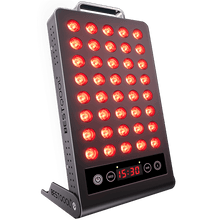
 Small
Small

 Moderate

 Moderate

 Moderate

 Full
Full

