
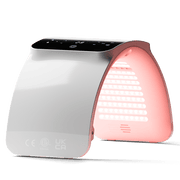
For a hands-free BestQool facial session, the relevant format is a panel that can remain stable at the documented distance without being supported by your hands. The documented routes are a hanging setup, a separately confirmed stand setup, or---potentially---a clamp-type panel setup. BestQool lists stand options and its manual describes hanging hardware, but compatibility, included accessories, and positioning details need confirmation for the specific panel before purchase or use.
A 10--20 minute routine is therefore less about choosing the largest panel and more about building a setup that lets you sit or stand comfortably at the required distance for the full session.
Start with the Support Method

A hands-free panel arrangement needs a support method that can hold the device at face height and remain stable while you are seated or standing.
BestQool's manual describes installation with supplied hardware that includes a handle, hook, adjustable rope, power cord, goggles, and a door hook. This establishes hanging as a documented hands-free approach, but it does not establish that every model includes the same items. It also does not provide model-specific mounting loads, hanging heights, or clearance requirements.
BestQool's catalog also lists a Universal Stand and an Adjustable Mobile Stand. Those names indicate stand-based options exist, but the available information does not map either stand to particular panel models or panel dimensions. Do not assume a stand fits a panel simply because both appear in the catalog.
The BQ60Pro is identified as a clamp-type device. A clamp format may be relevant where a secure desk, table, or other suitable edge is available. However, the available listing does not specify the clamp's attachment range, supported orientations, or whether it can hold the panel at the necessary facial-treatment height.
Compare the Practical Setup Routes
| Hands-Free Route | What Is Documented | What to Confirm Before Relying on It |
|---|---|---|
| Hanging setup | The manual describes hardware including a hook, adjustable rope, and door hook. | Whether the selected model includes the hardware; safe mounting location; required height, clearance, and distance. |
| Stand setup | BestQool lists a Universal Stand and an Adjustable Mobile Stand. | Which panel models each stand supports; panel attachment method; height and angle range; floor footprint. |
| Clamp-type setup | The BQ60Pro is listed as clamp type. | Clamp opening range, suitable surface type, panel orientation, stability, and ability to reach face height. |
A useful test is to plan the position of both the panel and the chair before deciding on a format. If the device must be held, propped on an unstable surface, or placed so close that you need to lean forward throughout the session, the arrangement is not yet a practical hands-free setup.
Match the Panel Format to the Placement Space
BestQool's catalog distinguishes several panel formats: the Portable BQ40, BQ60, clamp-type BQ60Pro, BQ150, Half-Body Pro100, and Full-Body Pro200 and Pro300.
These labels help frame the scale of the setup, but they do not establish facial coverage. The available materials do not provide model-specific panel dimensions, beam dimensions, or measured coverage for the face, neck, or upper chest at a stated treatment distance.
That limitation matters. A larger format is not automatically a better facial format, and a smaller format is not automatically limited to face-only use. Coverage depends on the actual panel, its placement, its distance, and the area you intend to expose.
Use the Format Labels as Planning Clues
| If Your Main Planning Question Is... | Format Labels to Investigate | Details Still Needed |
|---|---|---|
| "Can I create a compact setup near a desk or chair?" | Portable BQ40, BQ60, or clamp-type BQ60Pro | Panel dimensions, stable support method, and documented distance. |
| "Can I position a panel for more than my face?" | BQ150 or Half-Body Pro100 | Actual illuminated area, mounting compatibility, and the space needed around the setup. |
| "Do I want a larger fixed setup?" | Full-Body Pro200 or Pro300 | Stand or hanging compatibility, placement footprint, and model-specific positioning guidance. |
Begin with the area you want to treat---not with a format label. For example, someone planning face-only use may prioritize a compact placement and easy height adjustment. Someone who wants to position the panel for face, neck, and upper chest should verify actual coverage information on the current product page rather than inferring it from "half-body" or "full-body" naming.
Plan Around Distance Before Choosing a Stand or Mount

A support method is only useful if it can keep the panel at the manufacturer's documented distance for the selected model and use mode.
The BestQool manual's general health protocol lists a position of 9 inches from the device for 20 minutes, 4 days per week. This is a useful reference point for evaluating whether a chair, desk, hanging location, or stand can support a roughly 10--20 minute routine.
However, it is not labeled as a facial-treatment protocol. It should not be treated as a universal facial instruction.
The manual also states different distances for "Pro100+" models: 12 inches for health use and 9 inches for treatment use. Because the extract does not define every model covered by "Pro100+" or provide a face-specific distance, the selected model's current instructions should control the final setup.
Run a Distance-First Setup Check
Before committing to a panel and accessory combination, check whether you can:
- Place the panel securely without holding it.
- Sit or stand at the model's documented distance without leaning forward.
- Keep your face centered in the intended treatment area for the full session.
- Reach the controls without destabilizing the support.
- Keep the power cord arranged so it does not interfere with the chair, stand, door, or walking path.
- Adjust the panel or chair position without looking directly into active near-infrared LEDs.
This approach avoids a common mismatch: choosing a support method first, then discovering that it cannot place the panel at a usable height or distance.
Treat Eye Guidance as Part of the Setup

Facial positioning changes the importance of eye protection. BestQool's manual instructs users to wear protective goggles for facial treatment when the 850 nm near-infrared mode is used. It separately states that goggles are not required for red-light-only facial use.
The manual also warns against looking directly at near-infrared LEDs for more than 2 minutes. In practice, that means goggles, panel angle, and chair position should be decided before starting the timer---not adjusted while looking toward an active panel.
The timer control described in the manual adds time in 5-minute increments up to 25 minutes. That is a control feature, not a facial-session recommendation. The same manual also states a maximum of 30 minutes for one session and 60 total treatment minutes per day, so consult the instructions for the specific model if its timer behavior and broader session limits appear different.
Confirm the Details That Cannot be Inferred
Before selecting a BestQool hands-free facial arrangement, verify the following on the current panel page, accessory page, and corresponding manual:
- The panel's actual dimensions and intended placement orientation.
- Whether hanging hardware, goggles, or other accessories are included with that model.
- Whether a Universal Stand or Adjustable Mobile Stand is compatible with the specific panel.
- Whether a clamp-type model can attach securely to the available surface and reach the needed height.
- The applicable distance, mode, and session instructions for facial use.
- The panel's treatment-area information at the documented distance.
- Timer operation and any session limits.
- Eye-protection instructions for the chosen light mode.
The manual also advises consultation before use for people who are pregnant, take light-sensitivity medications, are light-sensitive, or are uncomfortable or concerned about using the device. These are manufacturer precautions, not individualized medical advice.
The right BestQool format is the one that matches your intended treatment area, available placement location, preferred support method, and ability to maintain the documented distance without holding the device. Compare the relevant panel and accessory details together, then follow the applicable manual's setup and safety instructions before beginning a hands-free facial routine.


