
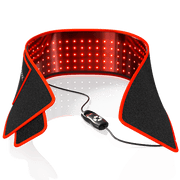
For a seated desk routine, the BestQool Redot S belt is the only format explicitly described as hands-free during desk work. A positioned panel can also leave your hands free, but only if the exact model can be secured at its stated treatment distance without interfering with your monitor, posture, eye protection, or workspace.
The practical choice starts with the body area you want to expose. A secured belt or wrap keeps the light on a localized area while you work. A panel requires room in front of, beside, or behind the desk and a stable mounting method that maintains the manufacturer's distance guidance.
Start with the Format That Can Stay in Place While You Work
BestQool's Redot line includes flexible, rechargeable, battery-powered body-contact formats: the Redot S belt, Redot M wrap, and Redot L mat. Their formats matter more for desk compatibility than a simple size comparison.
| Format | Documented Use Pattern | Body-Area Examples Stated by BestQool | Desk-Work Consideration |
|---|---|---|---|
| Redot S belt | Compact, hands-free belt | Lower back, abdominal area, sore arm muscles | Explicitly described for use while working at a desk |
| Redot M wrap | Broader localized wrap | Knees, shoulders, thighs, calves | May suit a larger localized area, but desk-time hands-free use while typing is not expressly stated |
| Redot L mat | Lie-on mat | Back and limbs | Intended for lying down rather than a seated desk session |
The Redot series format descriptions distinguish the S belt from the larger wrap and mat designs. For desk work, that distinction is important: the Redot S is documented as a hands-free belt, while Redot M is documented as a wrap but not specifically as a hands-free typing or computer-work format.
This also limits what can be assumed about coverage. The Redot S examples do not establish face, neck, or shoulder coverage. Conversely, Redot M is described for areas including shoulders and limbs, but the available information does not confirm whether its attachment method remains secure and comfortable throughout keyboard or mouse work.
The Redot L should be treated separately. Its mat format is meant for lying down with the back and limbs exposed, so foldability or portability does not make it a practical seated-work option.
When a Positioned Panel Can Fit a Seated Workspace
A panel can be hands-free because it does not need to be held. That does not automatically make it desk-suitable. The real question is whether the panel can be placed securely at the specified distance while you maintain normal working posture.
The first-generation X60 provides a documented tabletop-panel example. It has 60 LEDs: 30 at 660 nm red and 30 at 850 nm near-infrared. Its listed dimensions are 13.1 × 8.19 × 2.28 inches, and it weighs 4.82 lb (2.19 kg). Those dimensions describe the unit, not the body area it covers from a particular seated position.
More importantly, the X60's product guidance specifies a 6-inch (15.2-cm) distance for both skin and deeper-tissue protocols. It lists 30--45 minutes daily for skin and 70--90 minutes daily for deeper-tissue use. Moving farther away reduces irradiance and calls for longer treatment time according to that guidance.
That makes a panel-based desk setup more demanding than simply placing a light on the desktop. At 6 inches, consider whether the panel would:
- Block part of the monitor or keyboard area.
- Require you to lean forward or turn your head away from the screen.
- Direct light toward your eyes while you work.
- Restrict where your hands, chair, or desk accessories can go.
- Remain stable for the full session.
The X60 package includes a power cord, door hook, adjustable rope, protective eyewear, and user manual. Its included-accessory list does not document a desk clamp or dedicated desktop stand. A tabletop label should therefore not be treated as confirmation that the panel can be safely mounted beside a monitor or attached to a desk.
Verify the Mount Before Calling a Panel Hands-Free
A panel setup is only hands-free after the panel is supported safely and in a way that matches the model's compatibility information. Do not assume that one BestQool panel's stand or mount applies to another panel.
| Support or Model Detail | What Is Documented | What Still Needs Confirmation |
|---|---|---|
| Universal Stand | Listed for BQ150, Pro100, Pro200, and Pro300; rated for up to 66 lb (30 kg) | Whether it fits the available desk and chair clearance |
| Universal Stand base | Wheeled base with four brakes; listed dimensions of 21.6 × 18.1 × 7.8 inches | Whether the base fits beside, behind, or under a particular desk |
| BQ60Pro | Identified as a "Clamp Type" model | Clamp dimensions, mounting instructions, treatment distance, coverage, and controls |
The Universal Stand compatibility listing does not list X60, BQ40, BQ60, or BQ60Pro as compatible models. Its wheeled base and brake system are workspace considerations, not proof that it will fit any office layout. Installation guidance also calls for locking all four wheels and requires at least two people for safe panel installation.
The available product list identifies the BQ60Pro as a "Clamp Type" model, but that label alone does not establish that it will fit a particular desk, clear a monitor arm, or hold a usable position for seated work. Confirm the current product documentation and manual before relying on a clamp-style setup.
Protect Monitor Use, Eyes, Cords, and Posture During a Desk Session
Desk work creates a different safety and comfort test than a session away from screens. You need to be able to look at your monitor without looking toward the LEDs, maintain a neutral seated position, and keep cords and support hardware out of the chair's path.
BestQool's general FAQ recommends protective eyewear during each session, including when using red light only for added comfort and protection. The applicable model manual should control when its instructions are more specific.
A model-extracted manual summary covering BQ40, BQ60, BQ150, Pro100, Pro200, and Pro300 says not to look directly at near-infrared LEDs for more than two minutes. It also states limits of 30 minutes per session and 60 total minutes per day. Because that summary does not cover X60, do not apply those limits to X60 in place of its own instructions.
Before beginning a desk session, check the following:
- Monitor sightline: Can you work without facing or looking toward the LEDs?
- Eye protection: Have you followed the instructions for the exact model and wavelength setting?
- Stable support: Is the panel, stand, clamp, or hanging arrangement secured as instructed?
- Heat and ventilation: Follow the model's manual for clearance, surface temperature, and unattended use warnings.
- Chair movement: Will chair wheels, foot placement, or leg movement contact a power cord or stand base?
- Posture: Can you sit naturally without leaning, twisting, or holding a body area in an uncomfortable position?
- Light sensitivity: BestQool advises people with light sensitivity not to use its red-light therapy unless a doctor advises otherwise.
If normal desk work requires repeated repositioning, close viewing of LEDs, or compromised posture, the setup is not functionally hands-free even if neither hand is holding the device.
Compare Session Requirements at the Actual Working Position
Time, distance, and output should be compared at the position where you will actually sit---not from a product photo or an electrical-wattage number.
The Redot collection states that sessions take 10--20 minutes, but that is collection-level guidance rather than a model-specific protocol. A panel may have different distance and duration instructions. The X60, for example, uses its own 6-inch protocol and substantially longer listed daily durations.
When comparing panels, use irradiance at the intended treatment distance. As BestQool's irradiance explanation notes, light intensity at the skin changes with distance as the light spreads. Electrical wattage describes power draw; it does not by itself establish the amount of light reaching the treatment area or the area covered.
Use This Desk-Setup Decision Framework
-
Identify the target area. For localized areas such as the lower back, abdominal area, or arm muscles, a secured body-contact format may better preserve a normal workstation layout. For a panel, define the precise area you intend to expose rather than assuming full seated-body coverage.
-
Match the format to the working posture. The Redot S is the documented hands-free desk format. Treat Redot M as a broader wrap whose desk wearability needs confirmation. Treat a panel as conditionally hands-free only if its required distance, support method, and light direction work with your desk.
-
Verify the exact model before use. Check the product page and applicable manual for distance, session guidance, eyewear instructions, compatible accessories, mounting requirements, power routing, and stability. Confirm that the full session can be completed without blocking monitor use, straining posture, or looking toward the LEDs.


